 💡 Guide
What to Write on Your Wedding QR Code Sign: 50+ Best Ideas for 2026

Quick Answers: Wedding QR Code Sign Ideas
Where should you display QR code signs at a wedding?
Place QR codes at every reception table, the bar area, the photo booth, near the ceremony exit, and on the welcome sign. Multiple placements increase photo collection by 2-3x compared to a single sign.
What should a wedding QR code sign say?
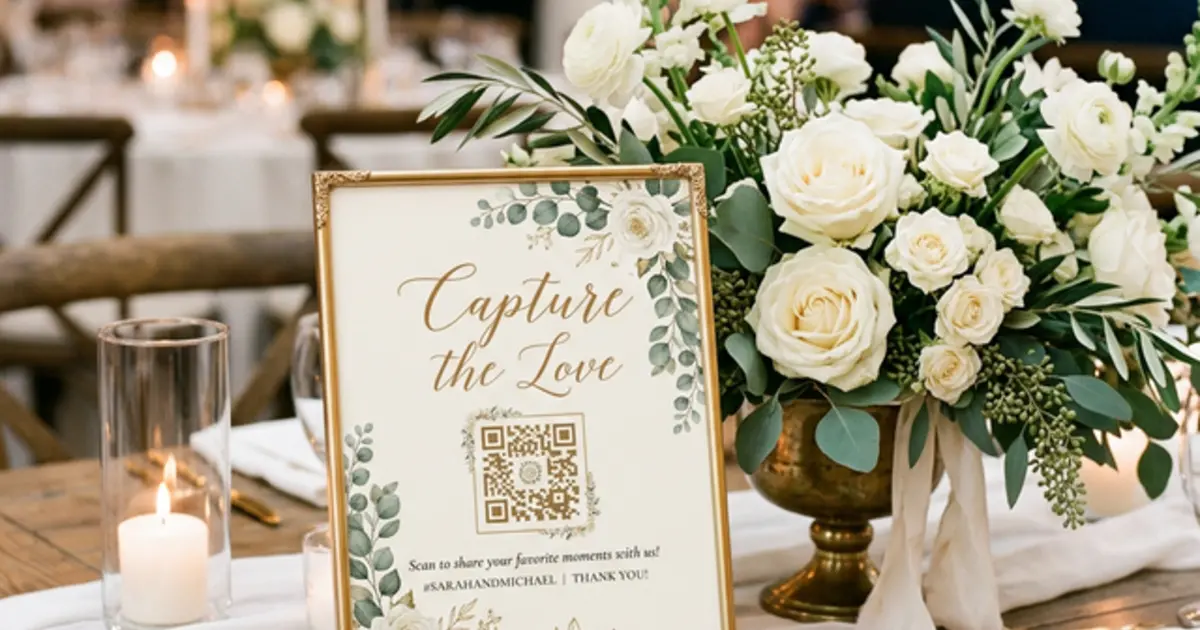
Keep it simple and action-oriented. Examples: 'Scan to share your photos with us!' or 'Help us capture the day - scan to upload your best shots.' Include a brief instruction: 'Just point your phone camera at the QR code.'
You’ve decided to use a wedding photo sharing app to collect all the amazing candid moments your guests will capture. You’ve generated your QR code. Now comes the hard part: what do you actually write on the sign to make people scan it?
If your sign just says "Scan Here," guests might ignore it. If it’s too long and complicated, they won’t bother reading it. The secret to getting hundreds of guest photos is the perfect balance of catchy, sweet, and clear.
Whether you want something funny to put near the bar, or something sentimental for the dinner tables, we’ve compiled the ultimate list of the 50+ best wedding QR code sign wordings for 2026.
Category A: The "Fun & Witty" (Best for engagement!)
These are perfect for the bar area, the dance floor, or if you and your partner just have a playful personality. A little bit of humor goes a long way in encouraging guests to pull out their phones.
- "Help us see what we missed while we were making out."
- "Pics or it didn’t happen! Scan to upload."
- "I spy with my little eye... something you should upload!"
- "Be our unofficial photographer for the night."
- "Your photos + our memories = the perfect match."
- "Trust me, you can dance. – Alcohol. (Prove it by uploading your photos here!)"
- "We know you’re on your phone anyway. Scan this!"
- "Do it for the 'Gram... but also do it for our Google Drive."
- "Paparazzi training camp: Scan to submit your best shots."
- "Warning: Highly embarrassing dance moves to be captured and uploaded below."
- "Capture the blackmail material here."
- "We want the good, the bad, and the blurry."
Category B: The "Sentimental & Sweet"
If you're looking for phrasing that feels romantic and heartfelt, these options are perfect for table centerpieces, the guestbook table, or the ceremony entrance.
- "Through your eyes, into our hearts. Please share your photos."
- "A lifetime of memories starts today. Help us capture them all."
- "Your perspective is our favorite gift. Scan to upload."
- "Capturing the love from every table. Please scan and share."
- "Help us remember every second of our favorite day."
- "Love is in the air, and memories are on your phone. Please share them!"
- "Today is a blur of love. Help us see it clearly tomorrow."
- "You are our favorite people. Please share your favorite moments."
- "We can't be everywhere at once. Be our eyes and share your photos."
- "Collect moments, not things. (But please upload the moments here!)"
Category C: The "Short & Functional"
Sometimes, less is more. If your sign is small (like a business card size at each place setting) or your design is minimalist, stick to the point.
- "Scan. Upload. Enjoy!"
- "Our Digital Wedding Album. Scan here."
- "Share the love! Upload your photos here."
- "Guest Photos & Videos. Scan to contribute."
- "Snap it. Scan it. Share it."
- "Wedding Photo Upload"
- "Point Camera Here -> Share Photos"
- "The [Last Name] Wedding Gallery"
- "Digital Disposable Camera: Scan Here"
- "Drop your photos here!"
Category D: The "Instructional" (High Friction-Killer)
This is the "secret sauce" for SEO and getting high participation rates. The biggest reason guests don't upload photos is they think they have to download an app. You need to tell them explicitly that it’s easy!
- "No app needed! Just scan your camera and upload."
- "Instant sharing! Scan to send your photos straight to our Drive."
- "Share the night in 30 seconds. Scan here!"
- "1. Open Camera. 2. Scan Code. 3. Upload Photos. Simple!"
- "No downloads required. Just scan and share."
- "Send photos directly to our Google Drive. Scan here."
- "Tap, select, and send! Takes 10 seconds."
- "Leave the app store alone. Scan here to upload instantly."
Where to Place Your QR Code Signs
Having a great sign is only half the battle. If guests don't see it, they won't scan it. Here are the best places to display your QR codes:
- On the tables: A small acrylic sign or a printed card at every table setting guarantees every guest sees it while sitting down.
- At the bar: People congregate at the bar. While they are waiting for a drink, they have their phones out.
- Next to the guestbook: This is a natural transition from writing a message to sharing a digital guestbook photo.
- In the bathroom: Believe it or not, restroom mirrors are prime real estate for selfies. A small sticker or sign on the mirror works wonders!
- At the welcome table: Catch them as they walk in.
How to Make Your Own QR Code Photo Sharing Sign (It's Free!)
Ready to put these ideas into action? You can set up your entire photo sharing system in less than 60 seconds with EventSnap.
Instead of forcing guests to download a messy app, EventSnap generates a custom QR code that sends photos directly to your personal Google Drive folder. Guests just scan with their normal phone camera and upload from their mobile browser.
Here’s how to do it:
- Go to EventSnap.co and click "Get Started Free".
- Sign in with your Google Account (this is where the photos will be saved).
- Give your event a name (e.g., "Sarah & Tom's Wedding").
- Download your custom QR code instantly.
- Print it on your signs using Canva, Zazzle, or your favorite local printer!
EventSnap is 100% free for up to 50 uploads, and just $9.99 for unlimited uploads and full-resolution videos. Create your free event today and start collecting every beautiful memory!
Ready to collect every guest photo?
Get your custom QR code and start collecting directly to your Google Drive.
Create Your Free EventWant to build your own aesthetic QR Code?
Avoid expired links and scaling issues. Read our definitive generation guide:
The Ultimate Step-by-Step Generation Guide (2026)