 ⚖️ Comparison
WedUploader vs EventSnap (2026): Which is Better for Your Wedding?
If you're planning a wedding and looking for a way to collect guest photos without asking them to download an app, you've likely realized one important thing: you want the photos stored in your Google Drive.
Apps like GuestPix and Kululu store your memories on their own servers, meaning you have to download them before your gallery expires. But if you use a direct-to-Drive tool, the photos are yours forever.
This brings most couples to a decision between the two biggest players in the "direct to Google Drive" space: WedUploader and EventSnap.
Both do the core job well. But there are massive differences in the guest experience, video handling, and modern features. Here is the honest, comprehensive comparison for 2026.
1. The Guest Experience & User Interface
When Uncle Bob scans the QR code at his table, what does he see?
WedUploader's Guest View
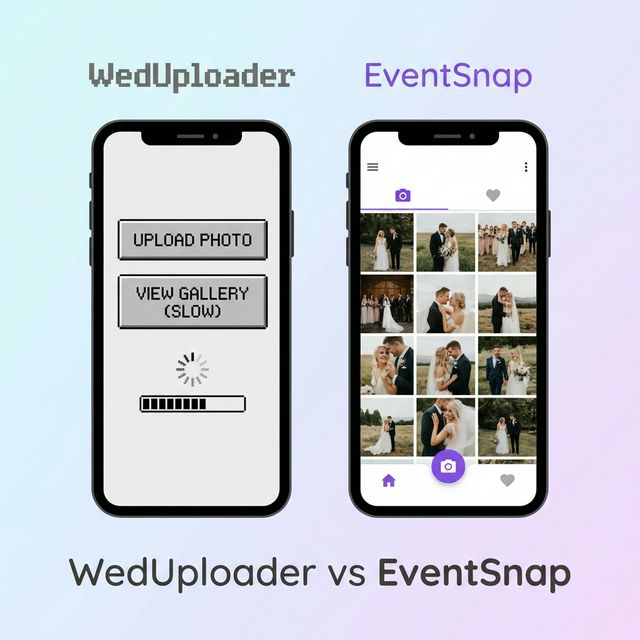
WedUploader was one of the early pioneers in this space, and its interface feels a bit dated. It focuses solely on utility. Guests see a basic page to select files. Viewing the gallery later can be clunky, and it feels more like a file upload tool than a celebration of your event.
EventSnap's Guest View
EventSnap was built with a "modern app" philosophy, even though it runs entirely in the browser. When guests scan the QR code, they see a beautiful, branded upload screen. The gallery experience feels like scrolling through a private Instagram feed. It’s fast, native-feeling, and visually stunning.
Winner: EventSnap. The modern interface significantly increases the number of photos guests actually upload because it feels effortless.
2. Video Handling & Playback
Photos are great, but videos of the best man's speech and the dance floor are priceless.
WedUploader
WedUploader accepts video uploads to your Google Drive. However, when guests try to view videos in the shared gallery, they are often redirected to the ugly Google Drive player in a new tab, breaking the immersive experience.
EventSnap
EventSnap accepts videos up to 1GB per file. More importantly, EventSnap features inline video playback. When a guest taps a video in the gallery, it opens in a beautiful, fullscreen theater mode right inside the app. No bouncing out to new tabs.
Winner: EventSnap (by a landslide, if video matters to you).
3. Additional Features: What Else Do You Get?
This is where the two platforms truly diverge.
WedUploader
WedUploader keeps it strictly to photos and videos. It is a utility for getting files from Phone A to Google Drive B.
EventSnap
EventSnap includes several features designed to enhance the actual wedding day:
- 📝 Digital Guestbook: Guests can leave heartfelt written messages attached to their photos.
- 📺 Live Slideshow: Connect a laptop/TV at your reception, and EventSnap automatically displays a beautiful, rotating slideshow of photos as guests upload them in real-time.
- 🌍 Multilingual Support: Having an international wedding? EventSnap is fully translated into multiple languages (Spanish, Bulgarian, etc.), automatically detecting the guest's phone language.
Winner: EventSnap. The Digital Guestbook alone makes it worth the switch.
4. Pricing & Hidden Costs
Both platforms have free tiers, but let's look at the reality of 50+ guests uploading high-res files.
| Feature | WedUploader | EventSnap |
|---|---|---|
| Free Plan | Yes (Ads, basic) | Yes (1 event, 50 uploads) |
| Premium Single Event | ~$29 (Remove ads) | $9.99 (Unlimited uploads) |
| Live Slideshow | Requires extra software | Included in Premium |
| Storage Fees | $0 (Uses your Drive) | $0 (Uses your Drive) |
EventSnap's single-event price ($9.99) is highly competitive, unlocking unlimited uploads, password protection, and the live slideshow for less than the cost of a wedding signature cocktail.
Winner: EventSnap for value.
The Final Verdict
Choose WedUploader if: You only want a bare-bones utility to move files, and you don't care about the visual experience or extra features.
Choose EventSnap if: You want your guests to have a seamless, beautiful "app-like" experience. If you care about video playback, gathering written messages in a digital guestbook, and running a live slideshow at your reception, EventSnap is the clear modern choice for 2026.
Start collecting directly to your Google Drive
Free to start — no credit card needed.
💍 Try EventSnap Free